Every AI action spends credits. Your plan gives you an allowance each month, and it resets at the start of each billing period.
Steps
-
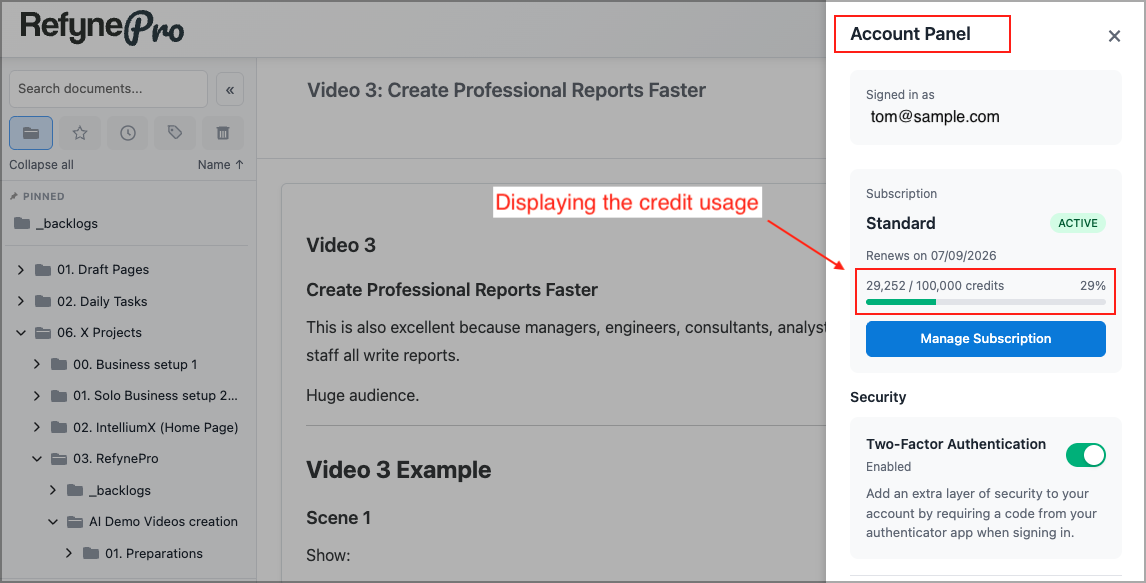
Click the person icon in the Header to open the Account Panel.
-
Read the credit bar under your plan name. It shows how many credits you have used out of your allowance, and the same figure as a percentage.
-
Watch for the warnings. Past 80% used you will see Running low on credits, and past 95%, Almost out of credits!
What one action costs
Every AI result window shows its own cost at the bottom: which model ran, the tokens it used (input, output and total), and the resulting credit cost.
Tokens are how AI models measure text — very roughly, one token is three or four characters. The credits you are charged depend on how much text went in and came back, and on which model you chose. Premium models cost considerably more per action than Budget ones.
Important: Credits are charged when the result appears, not when you accept it. Choosing Discard still uses them.
When you run out
AI Tools changes to Limit Reached and AI actions stop working until your allowance resets or you upgrade. Everything else — writing, organising, searching — carries on as normal.